Why Can't I See Facebook Comments During My Stream?
If you are streaming to your Facebook Profile using YYCam Pro and notice that viewer comments are not appearing in the software's comment panel, it is likely due to Facebook's privacy settings.
By default, when streaming to a personal profile, Facebook often sets the privacy to "Friends-Only" (even if YYCam Pro requests public access). To allow YYCam Pro to receive and display these comments, your stream must be set to "Public."
Here is how to fix this:
1. How to Make All Your Future Streams Public (Recommended)
To ensure your comments show up automatically every time you go live, you need to adjust the app permissions within Facebook:
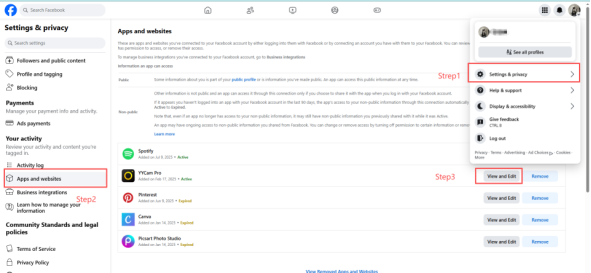
1. Log in to Facebook and go to your Apps and Websites settings page.
2. Find YYCam Pro in the list (if it's not there, check the "Business Integrations" tab).
3. Click "View and edit."
4. Look for the section titled "Who can see you use this app?" or "Who can see you use this business integration?".
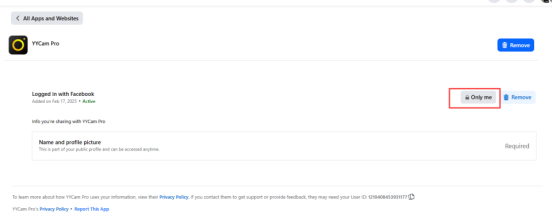
5. Select "Public" from the dropdown menu.
6. Click "Save."
Now, when you stream to your profile, viewer comments will appear in your YYCam Pro studio.
2. How to Make Your Current Stream Public
If you are live right now and don't want to stop the broadcast, you can update the privacy of the active stream:
1. Find your live stream on Facebook.
2. Click the privacy icon (usually a small "Friends" or "Lock" icon) next to the post's timestamp.
3. Change the setting to "Public."
4. Once changed, new comments should start appearing in your YYCam Pro dashboard within a few moments.
Note: Due to Facebook's API limitations, some scheduled broadcasts may not allow privacy changes once live. If the icon is greyed out, you may need to end the stream, follow the steps in Part 1, and start a new broadcast.
Frequently Asked Questions (FAQ)
l Why is "Public" required?
Facebook's privacy policy prevents third-party apps like YYCam Pro from reading data (like comments) from posts that are not public. This is a security measure to protect non-public user interactions.
l Does this apply to Facebook Pages?
Usually, no. Streams to Facebook Pages are public by default. This issue is almost exclusively related to streaming to personal Profiles.